For YouTubers, creators and thumbnail designers

Create high-CTR YouTube thumbnails with ChatGPT—without guesswork.

A complete step-by-step system for planning, prompting, generating, refining, and reviewing YouTube thumbnails that look clearer, more professional, and more clickable.

Complete thumbnail workflow
Copy-and-paste AI prompts
Fillable planner and scorecard
Secure checkout on Selar. Download immediately after payment.
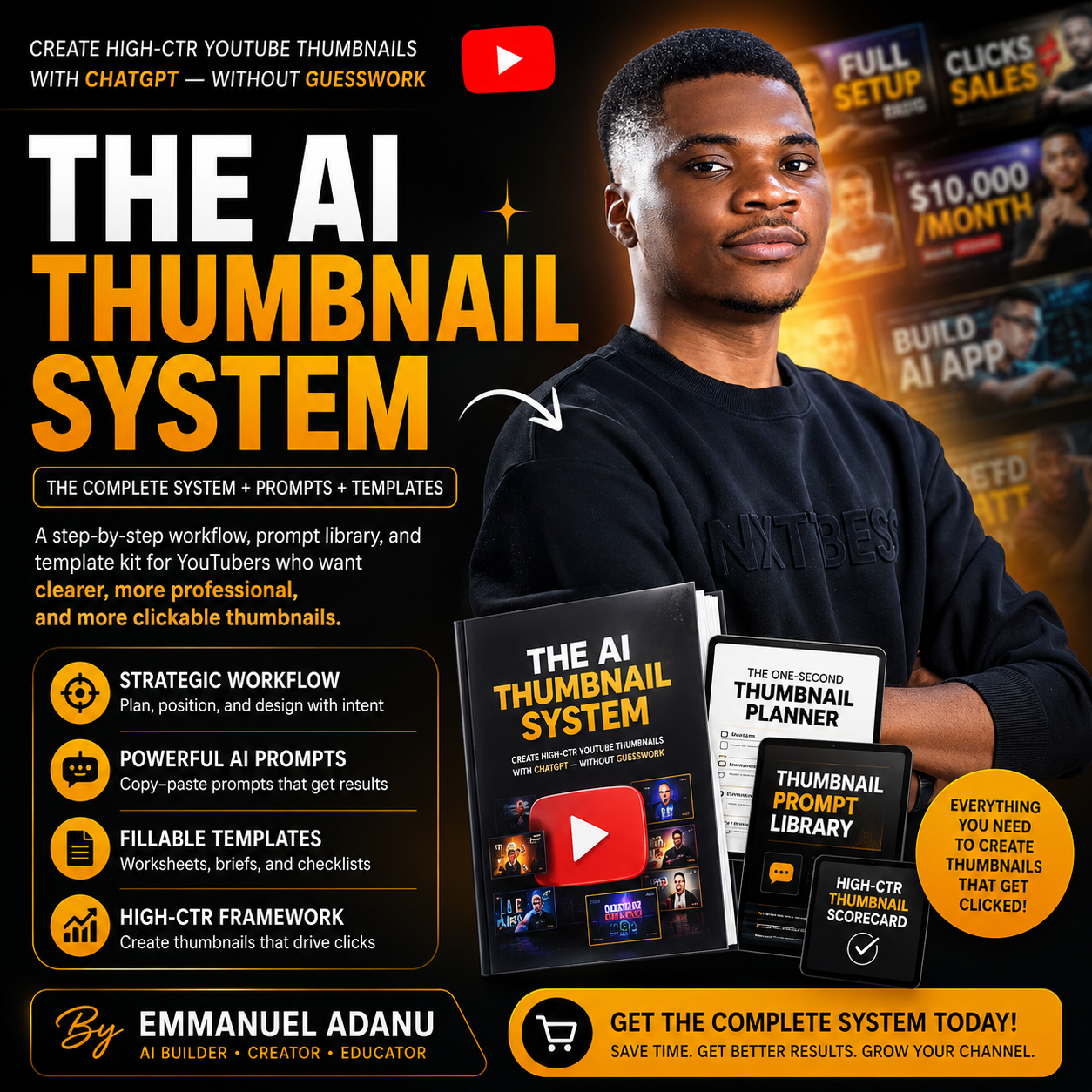
The AI Thumbnail System product bundle flyer
45+ prompts Ready to copy and use
Complete system Plan → Create → Refine
Beginner-friendlyNo design degree required
Reusable workflowUse it for every new video
Practical templatesNo generic theory
Instant downloadStart creating immediately
Why most AI thumbnails fail

A vague prompt produces a vague thumbnail.

Most creators ask AI to “make a YouTube thumbnail” before deciding what the thumbnail should communicate. The result may look colourful, but it often fails to give viewers a clear reason to click.

The usual approach

Random prompting and endless revisions

  • Generic layouts that look like everyone else
  • Small faces and weak expressions
  • Unreadable or incorrect text
  • Distorted hands, logos, and screenshots
  • Too many objects competing for attention
  • No clear relationship between title and thumbnail
The better approach

One repeatable system from idea to final thumbnail

  • Clarify the video promise before designing
  • Choose one strong visual concept
  • Prepare the correct photos, logos, and screenshots
  • Generate with a structured master prompt
  • Improve one issue at a time
  • Review the result with a practical scorecard
Everything you need in one package

What’s included in The AI Thumbnail System

This is not a single ebook. It is a complete implementation kit designed to help you move from a blank idea to a polished, ready-to-publish thumbnail.

02

Thumbnail Prompt Library

A reusable collection of prompts for planning, generation, revisions, and quality control.

  • Concept generation prompts
  • Master image prompt
  • Face, hand, and posture fixes
  • A/B variation prompts
03

One-Second Thumbnail Planner

A fillable PDF workbook that helps you plan the strategy and visual direction before generating.

  • Video promise worksheet
  • Concept selection scorecard
  • Asset and photo planner
  • Revision and performance tracker
04

High-CTR Quality Framework

A structured review system for checking clarity, curiosity, readability, composition, and professional finish.

  • One-second clarity test
  • Mobile-size review
  • Title-thumbnail alignment
  • Publishing checklist
Emmanuel Adanu, creator of The AI Thumbnail System
Created by Emmanuel Adanu AI educator, creator and online business consultant
What changes after you use the system

Stop starting every thumbnail from zero.

Build a repeatable process you can use for tutorials, reviews, business videos, software demonstrations, case studies, and client projects.

01

Create faster

Move from idea to first draft with a clear brief and a proven prompt structure.

02

Get more consistent AI results

Tell ChatGPT exactly what to create, what assets to use, and what mistakes to avoid.

03

Make clearer visual decisions

Choose concepts based on clarity, curiosity, and viewer desire instead of personal preference alone.

04

Improve thumbnails without destroying them

Use focused revision prompts to correct one problem while protecting the parts that already work.
A simple, repeatable process

From video idea to publishing-ready thumbnail

1

Plan

Define the audience, promise, emotional hook, and one-second message.

2

Prepare

Gather your creator photo, logos, screenshots, and visual references.

3

Generate

Use the structured master prompt to create a strong first draft.

4

Refine

Correct the highest-priority issue using focused editing prompts.

5

Review

Check clarity, text, expression, anatomy, composition, and mobile readability.

6

Publish

Export the final file, upload it, and track performance for future improvements.

One payment. Complete access.

Build better thumbnails without wasting hours on trial and error.

Get the complete system, prompt library, and fillable planner for less than the cost of hiring a designer for one thumbnail.

The AI Thumbnail SystemIncluded
Thumbnail Prompt LibraryIncluded
One-Second Thumbnail PlannerIncluded
Quality Scorecard and ChecklistsIncluded
Complete digital product bundle
10,000

One-time payment. No subscription.

  • Instant digital access
  • Beginner-friendly instructions
  • Reusable prompts and templates
  • Use for your own channel or client workflow
Get The AI Thumbnail System
Secure payment and delivery through Selar
Frequently asked questions

Questions before you get started?

Here are the most common things creators want to know about the system.

Get instant access →

No. The system was created for beginners and non-designers. It guides you through the strategic and visual decisions before you ask AI to generate the image.

No. You can complete the core workflow using ChatGPT. Canva, Photopea, or Photoshop are optional tools for final text correction or advanced cleanup.

No honest product can guarantee virality. Video performance also depends on the topic, title, audience, retention, and distribution. The system helps improve clarity, professionalism, and click potential.

Yes. Replace the creator photo with a product, object, character, screenshot, transformation, or other strong visual subject.

Yes. The prompts use customizable placeholders and can be adapted to tutorials, reviews, business content, software videos, case studies, product videos, and many other formats.

After completing payment through Selar, you will receive immediate access to download the digital product files.

Your next thumbnail should not begin with guesswork

Create with a plan. Prompt with clarity. Publish with confidence.

Get Instant Access — ₦10,000
Complete system ₦10,000
Get Access